

Uploading Favicon
by
RV Support
2025-11-25 07:59:34
If you want to set your Favicon Go to Design Tab > Site Properties > Favicon > Choose File and select Show Favicon then click Save.
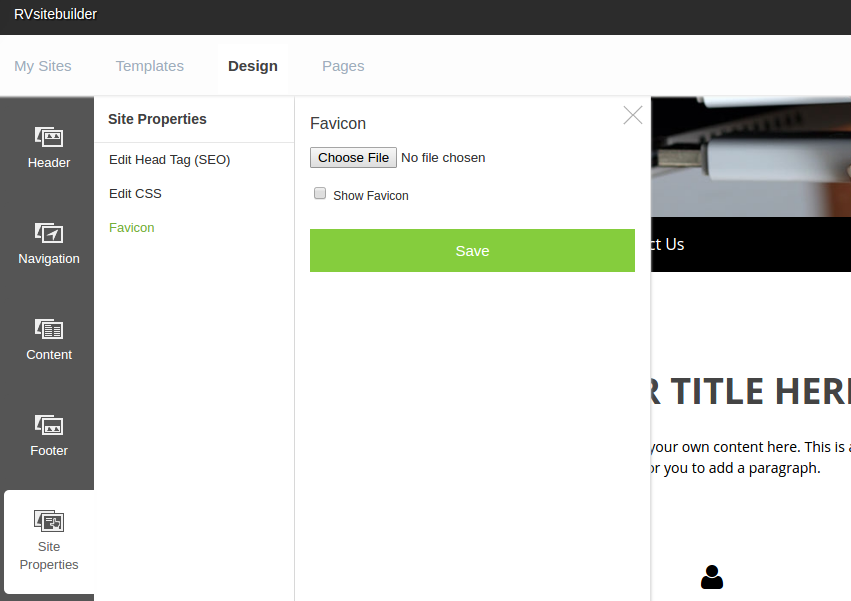
If you don't have favicon file that is in ".ico" format, you have to convert your image file to ".ico" first by using converter website. We suggest using https://www.icoconverter.com/ to convert it (You can use other converter site as well).
Click "Convert" then your file will be downloaded and saved.
You can name your file any name, but when you upload your file to RVsitebuilder, its name in the program will be renamed to "favicon.ico" automatically.
Articals in this section
-
Make a Bookmark on your page
Updated on 2025-11-18 08:04:58
-
How to add a cookie and privacy banner on RVSB 6?
Updated on 2025-11-18 08:04:58
-
How to check your RVsitebuilder version?
Updated on 2025-11-18 08:04:58
-
How to select language on RVsitebuilder program
Updated on 2025-11-18 08:04:58
-
Added a feature for generating “Privacy Policy” page in RVsitebuilder version 6
Updated on 2025-11-18 08:04:58
-
Adding new page, Rearrange page name on Navigation
Updated on 2025-11-25 08:01:37
-
Adding Paypal widget
Updated on 2025-11-25 08:01:35
-
Adding Section
Updated on 2025-11-25 08:01:35
-
Copy an image from external
Updated on 2025-11-25 08:01:35
-
Create a website with RVsitebuilder 6
Updated on 2025-11-25 08:01:35
