

Uploading the image original file to RVsitebuilder version 6
by
RV Support
2025-11-25 08:01:34
Using your original image by uploading your image to File Manager.
1. Go to Cpanel -> File Manager
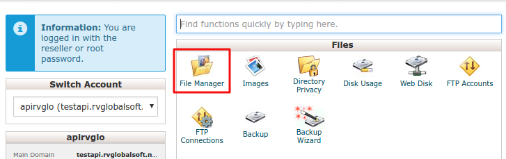
2. Choosing .rvsitebuilder -> projects -> id project (for example 00139a1adb29…)
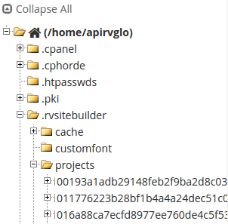
Tips: How to find your Project ID
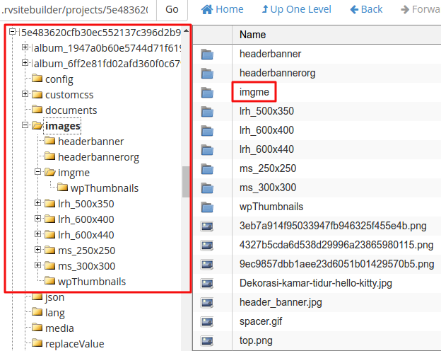
3. Choosing Images Folder > Create new Folder (example: imgme), and insert your .gif image here.
You can create new folder here
4. Deleting file deletejsonfirst.txt in folder project id
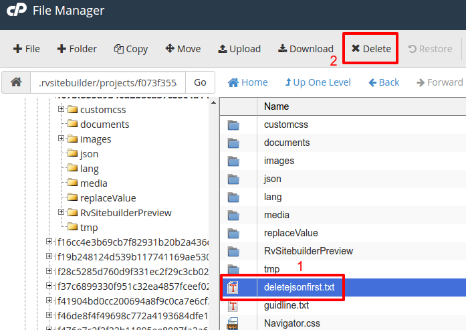
4.2 Then, delete 2 files in folder "json"; myimages.json and storeimages.json
5. Return to page editor Your image will display as thumbnails in “My Images”

=================================
Articals in this section
-
Make a Bookmark on your page
Updated on 2025-11-18 08:04:58
-
How to add a cookie and privacy banner on RVSB 6?
Updated on 2025-11-18 08:04:58
-
How to check your RVsitebuilder version?
Updated on 2025-11-18 08:04:58
-
How to select language on RVsitebuilder program
Updated on 2025-11-18 08:04:58
-
Added a feature for generating “Privacy Policy” page in RVsitebuilder version 6
Updated on 2025-11-18 08:04:58
-
Adding new page, Rearrange page name on Navigation
Updated on 2025-11-25 08:01:37
-
Adding Paypal widget
Updated on 2025-11-25 08:01:35
-
Adding Section
Updated on 2025-11-25 08:01:35
-
Copy an image from external
Updated on 2025-11-25 08:01:35
-
Create a website with RVsitebuilder 6
Updated on 2025-11-25 08:01:35
