

Installation Error Disk space is not enough on your website
by
RV Support
2025-11-18 08:05:35
If your have full disk space alert as shown in the following figure.
"Disk space is not enough on your website. Installation requires at least 250 MB free disk space"

The solution can be done by increasing the user quota area by going to the list account at the WHM (root) -> List account -> Select user and Change quota.
If you cannot access to WHM, please contact your host provider to update the quota for you.

Then increase your quota to more than 250 MB.
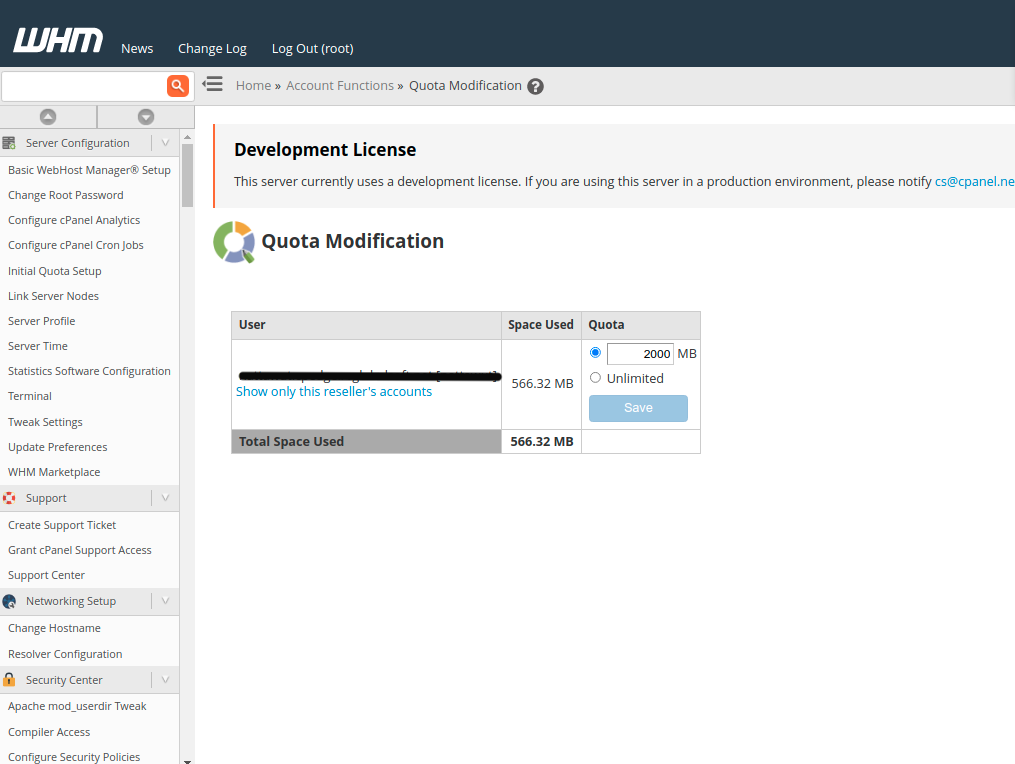
Access to RVsitebuilder 7 in cPanel of the account again. It will be ready to install and create site now.
Articals in this section
-
Create site error "Error: Please allow extension : 'mysqlnd','pdo','gd','curl','iconv', .......
Updated on 2025-11-18 08:05:39
-
Create site error "Error: Please set max_execution_time more than 90"
Updated on 2025-11-18 08:05:39
-
Create site error "Error: Please set memory_limit more than 64M."
Updated on 2025-11-18 08:05:38
-
Edit website returns Admin Login instead of content editor
Updated on 2025-11-18 09:17:55
-
Create site error "Error: Please allow function : 'posix_getpwuid', 'getmyuid', 'fileowner', 'stat', 'file_put_contents', 'parse_ini_file'"
Updated on 2025-11-18 08:05:38
-
Create site error "Error: Please allow function : json"
Updated on 2025-11-18 08:05:38
-
Create site error "Error: Please allow extension : json"
Updated on 2025-11-18 08:05:38
-
Create site error Running tar command unzip failed
Updated on 2025-11-18 08:05:38
-
Create site error "Not enough database"
Updated on 2025-11-18 08:05:37
-
Repair website error Prepare Installer : HTTP/1.1 301 Moved Permanently
Updated on 2025-11-18 08:05:37
