
logo
  • Contact Us |
  • Login
  • Login
  • RVsitebuilder
  • RVskin
  • RVssl
  • Support
  • Partner
    • RVsitebuilder NOC Partner
    • RVskin NOC Partner
    • SSL Reseller Program
  • Products
    • cPanel
    • CloudLinux
    • Softaculous
    • RVskin
    • RVsitebuilder
    • RVssl
    • Virtualizor
  • Installation
  • Why Us?
order
  • Support
  • Submit Ticket
  • Verify License
Knowledge Base Product Licenses Softaculous

How to update Softaculous license/key

by RV Support
2025-11-25 07:47:33

You can update your license on Admin Panel and click on "Refresh License".
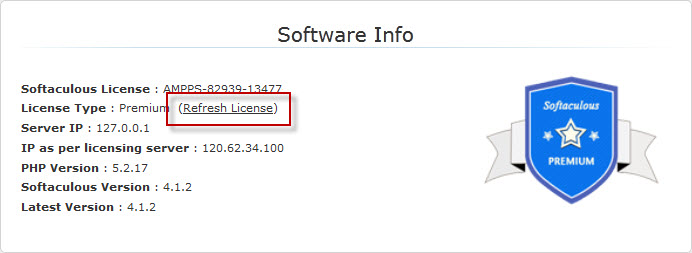

Or please see the guide how to update with the command line at https://www.softaculous.com/docs/How_to_Refresh_License


Softaculous System Requirements Previous Update RVglobalsoft ManagerNext

Articals in this section

  • How to update Softaculous license/key
    Updated on 2025-11-25 07:47:33
  • Softaculous System Requirements
    Updated on 2025-11-18 08:04:51
  • Softaculous Customer Support
    Updated on 2025-11-25 07:47:33
  • Softaculous Installation
    Updated on 2025-11-18 08:04:51
  • Reinstall Softaculous
    Updated on 2025-11-18 08:04:51
  • Verify Softaculous license
    Updated on 2025-11-18 08:04:51
  • Change License IP for Softaculous
    Updated on 2025-11-18 08:04:51
Privacy Policy   |   Terms of Service   |   Business SLA

rvsitebuilder

facebook twitter linkedin googleplus

COMPANY

Support
Contact
Login
Register
Why Us

SSL CERTIFICATES

Symantec
Thawte
Geotrust
RapidSSL

PRODUCTS

cPanel
CloudLinux
Virtualizor
Softaculous

LINKS

RVssl
RVskin
RVsitebuilder
Blog
RVskin Reseller
RVsitebuilder Reseller

Follow us

© 2020 - 2025 Netway Communication Co.,Ltd. All Rights Reserved.

Contact Us

  • Your address
  • admin@admin.com
RVsitebuilder | RVskin | RVssl | Support | Partner
2025 Company Inc. All rights reserved.   Powered by RVsitebuilder
  • RVsitebuilder
  • RVskin
  • RVssl
  • Support
  • Partner
    • RVsitebuilder NOC Partner
    • RVskin NOC Partner
    • SSL Reseller Program