

logo
  • Contact Us |
  • Login
  • Login
  • RVsitebuilder
  • RVskin
  • RVssl
  • Support
  • Partner
    • RVsitebuilder NOC Partner
    • RVskin NOC Partner
    • SSL Reseller Program
  • Products
    • cPanel
    • CloudLinux
    • Softaculous
    • RVskin
    • RVsitebuilder
    • RVssl
    • Virtualizor
  • Installation
  • Why Us?
order
  • Support
  • Submit Ticket
  • Verify License
Knowledge Base RVsitebuilder 5, 6 > Version 6 Creating Website

How to set Parallax effects for content block

by RV Support
2025-11-25 08:01:34

In “Page” tab while you’re setting up design for your content block, the Parallax Effect is what we recommend. At content, select a content block that you would like to make it wow, go to “Block”.

Background Color

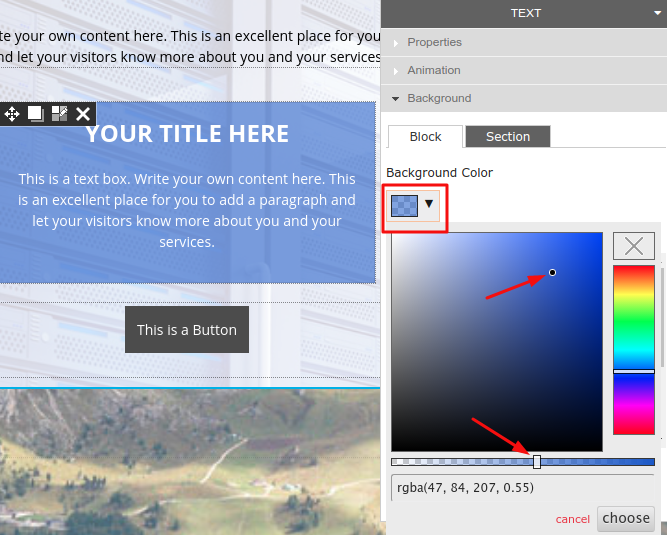
You can make content block Background Color in sharp or transparent by: Select content block and go to “Background Color”.
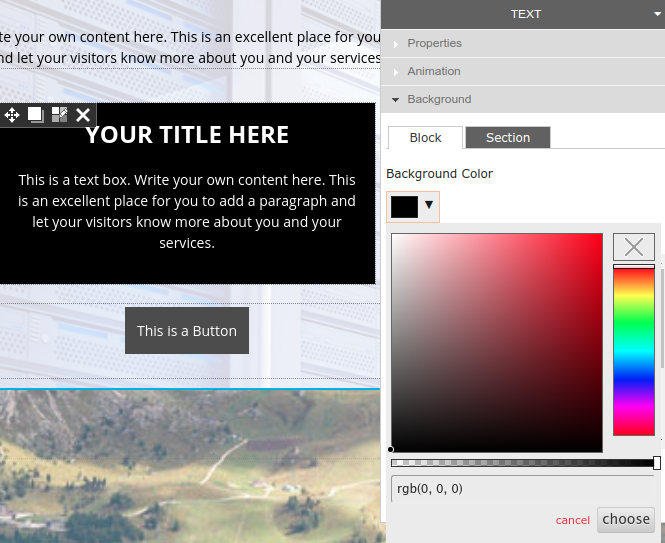
2. Use the color scale to make it sharp or transparent.
Parallax Scrolling Effect

Aside from Background Color, you can make the Block more attractive by giving it an effect in “Parallax Scrolling Effect”.

Feel free to select one from 19 effects.

None

Fade

Zoom

Slide In Left

Slide In Right

Slide In Up

Slide In Down

Fade In Left

Fade In Right

Fade In Up

Fade In Down

Zoom In Left

Zoom In Right

Zoom In Up

Zoom In Down

Fade Up Left

Fade Up Right

Fade Down Left

Fade Down Right


Advanced Parallax Effect

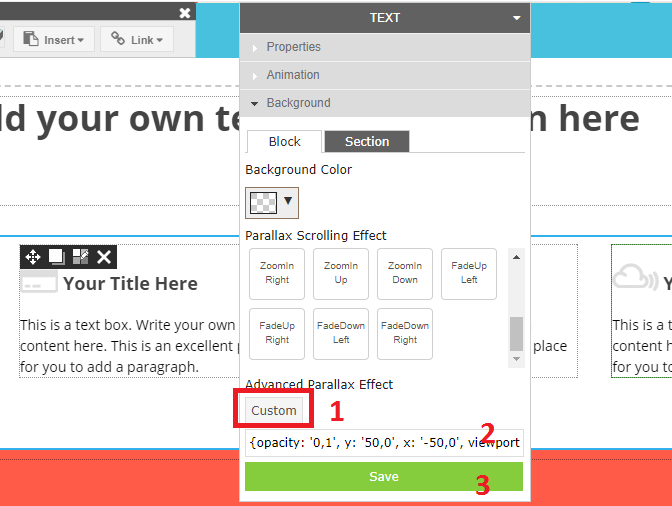
If making your content block with effect is not enough and you have CSS in mind. Please go to “Advanced Parallax Effect” to insert your own CSS, Save, and see what you’ve done!
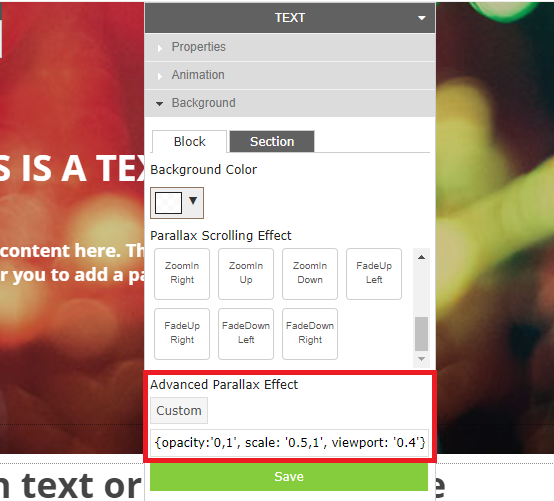
Custom Parallax Effect Guide

You can use “Clear Color Selection” to remove Background Color setting. It will remove color setting and turn block background back to White or as background of its section.
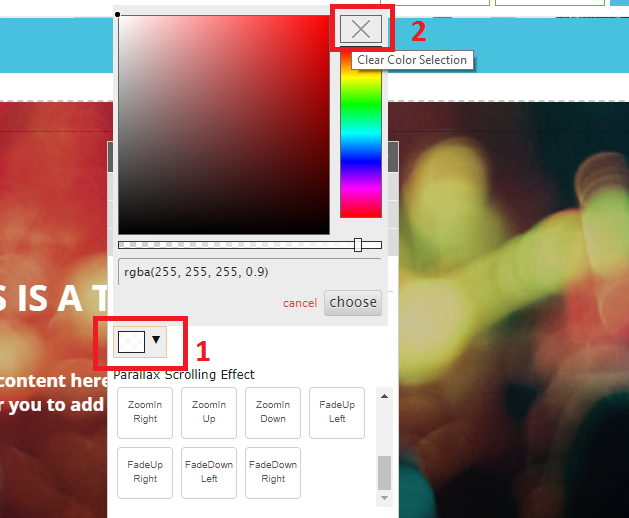
To remove Parallax Effect in Block, please use “Advanced Parallax Effect” function, click “Custom” to open code field, then remove all code, and Save.
===========

Present your website in full-screen Previous How to Rearange PageNext

Articals in this section

  • Make a Bookmark on your page
    Updated on 2025-11-18 08:04:58
  • How to add a cookie and privacy banner on RVSB 6?
    Updated on 2025-11-18 08:04:58
  • How to check your RVsitebuilder version?
    Updated on 2025-11-18 08:04:58
  • How to select language on RVsitebuilder program
    Updated on 2025-11-18 08:04:58
  • Added a feature for generating “Privacy Policy” page in RVsitebuilder version 6
    Updated on 2025-11-18 08:04:58
  • Adding new page, Rearrange page name on Navigation
    Updated on 2025-11-25 08:01:37
  • Adding Paypal widget
    Updated on 2025-11-25 08:01:35
  • Adding Section
    Updated on 2025-11-25 08:01:35
  • Copy an image from external
    Updated on 2025-11-25 08:01:35
  • Create a website with RVsitebuilder 6
    Updated on 2025-11-25 08:01:35
Privacy Policy   |   Terms of Service   |   Business SLA

rvsitebuilder

facebook twitter linkedin googleplus

COMPANY

Support
Contact
Login
Register
Why Us

SSL CERTIFICATES

Symantec
Thawte
Geotrust
RapidSSL

PRODUCTS

cPanel
CloudLinux
Virtualizor
Softaculous

LINKS

RVssl
RVskin
RVsitebuilder
Blog
RVskin Reseller
RVsitebuilder Reseller

Follow us

© 2020 - 2025 Netway Communication Co.,Ltd. All Rights Reserved.

Contact Us

  • Your address
  • admin@admin.com
RVsitebuilder | RVskin | RVssl | Support | Partner
2025 Company Inc. All rights reserved.   Powered by RVsitebuilder
  • RVsitebuilder
  • RVskin
  • RVssl
  • Support
  • Partner
    • RVsitebuilder NOC Partner
    • RVskin NOC Partner
    • SSL Reseller Program