logo
  • Contact Us |
  • Login
  • Login
  • RVsitebuilder
  • RVskin
  • RVssl
  • Support
  • Partner
    • RVsitebuilder NOC Partner
    • RVskin NOC Partner
    • SSL Reseller Program
  • Products
    • cPanel
    • CloudLinux
    • Softaculous
    • RVskin
    • RVsitebuilder
    • RVssl
    • Virtualizor
  • Installation
  • Why Us?
order
  • Support
  • Submit Ticket
  • Verify License
Knowledge Base RVstebuilder 7 > End User & Website Owner Creating Website

How to Set Google API

by RV Support
2025-11-18 09:17:35

To have Google Analytics Report on your website admin area at Marketing dashboard, you will need to set Google API as the following guide.


Google API Setup

1. Register at https://console.developers.google.com/ 

2.Create a new Google API for your domain name.

2.1 New with a fresh Google API

In Google APIs page, click Create for setting your new Google API.

(pic in user doc, not this one)

mkt4.png


2.2 You have experience and/or have some domain with current Google API active.

1) Click on project lisy

2) Click "NEW PROJECT"

GAPI2.2.png

3. Insert your Project Name, and click Create.

step3.png


4. Once the new project has been created, at Google APIs select your created project and click Credential.

step4.png


5. In Create credentials drop-down list, select OAuth client ID

6.png


6. Then, select Configure consent screen.

mkt9.png


7. Create your Product name shown to users and website URL at Homepage URL

For example: Product name shown to users : Calm Seas
Homepage URL : http://calmseas.netwaysite.com/

step7.png


8. At Create OAuth client ID page.
1) Select Web application
2) Create a name for recognizable
3) Insert Authorized JavaScript origins*
4.1) Insert Callback URL for MKT Setting* (Enter or click Create to add another field for 4.2)
4.2) Insert Callback URL for Social Login*
*Please login to your website admin, go to Marketing -> Go to Setup to bring the value for inserting 3, 4.1 and 4.2.
5) Don't forget to click Save.

step8.png


9. The Client ID and Client Secret are showing that you can copy before leaving this page by clicking OK.
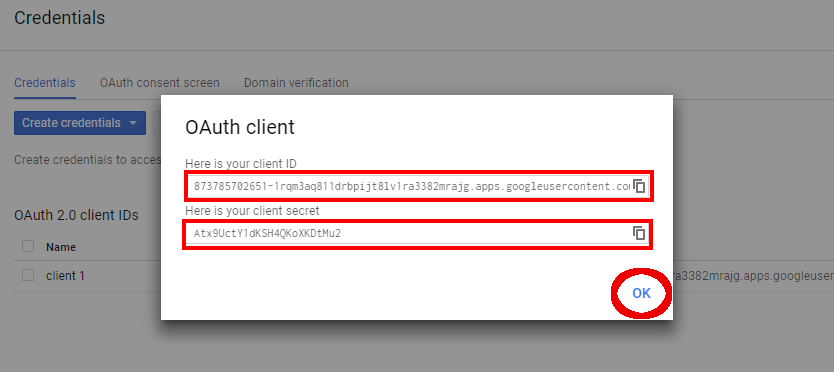
mkt12.png


10. Once you clicked OK to leave OAuth client, at Google APIs page , select Library.
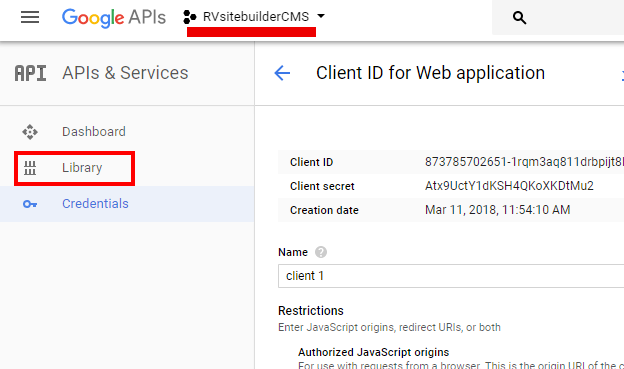
mkt13.png


11. Search for the following API setups to Enable them.

  1. Analytics API
  2. Google Analytics Reporting API
  3. Google Search Console API
  4. Google+ API
  5. Site Verification API

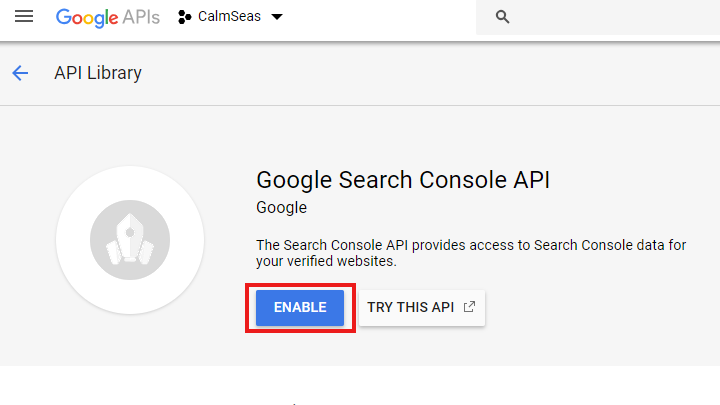
Sameple: Google Search Console API
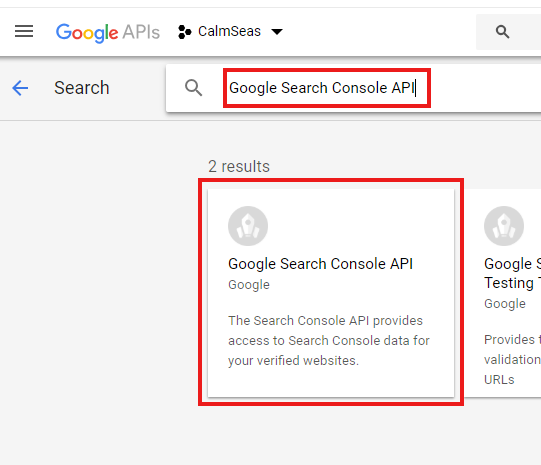
step11.png


Click Enable to activate the API.
step11.2.png


12. Login to your website admin, go to Marketing -> Go to Setup to insert Client ID and Client Secret form number 9.
Then click Create Google Authorization
(You can find details from number 9 at Google API, menu Credential, click on the created project.)
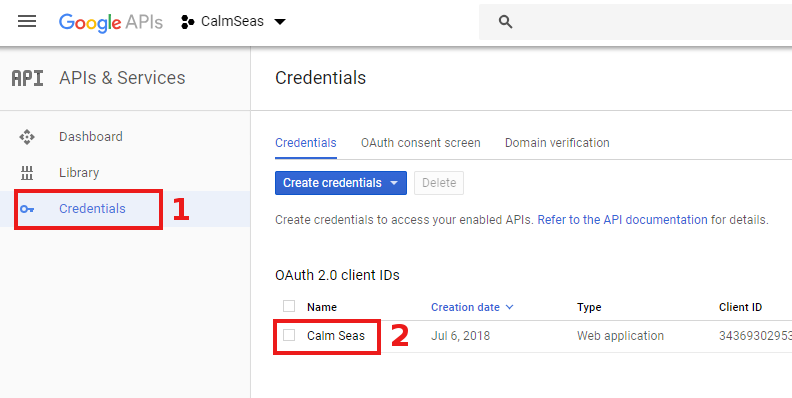
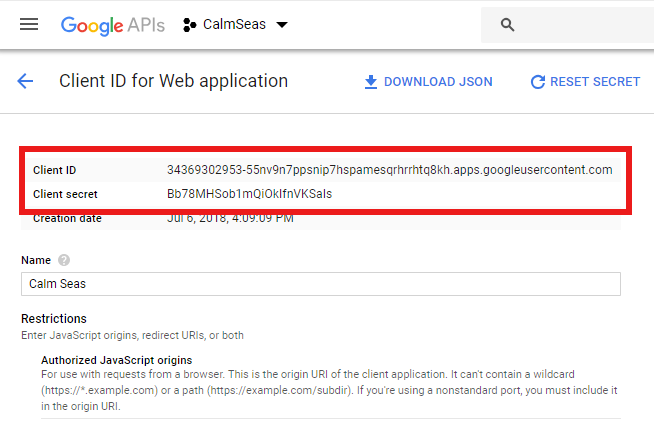
step12.1.png
step12.2.png


13. Once the detail are are successfully submitted, you will be leased to Google Login page.
Select account you want to use for Google Analytics setup for your website.
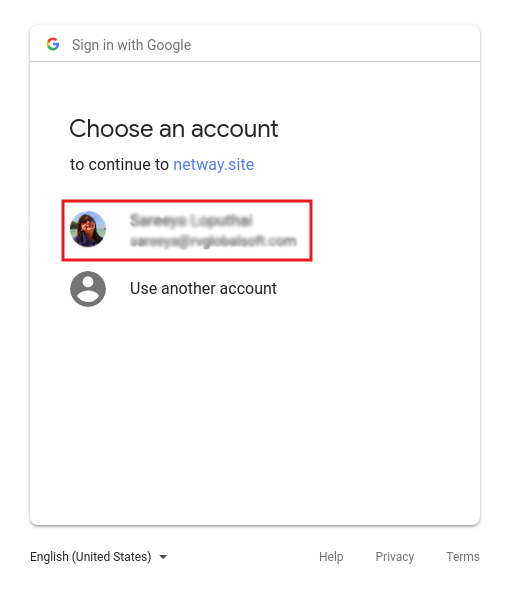
18.png


14. Allow Google to access by clicking ALLOW.

15. Once the setup completed, you will see Google API Setup page.
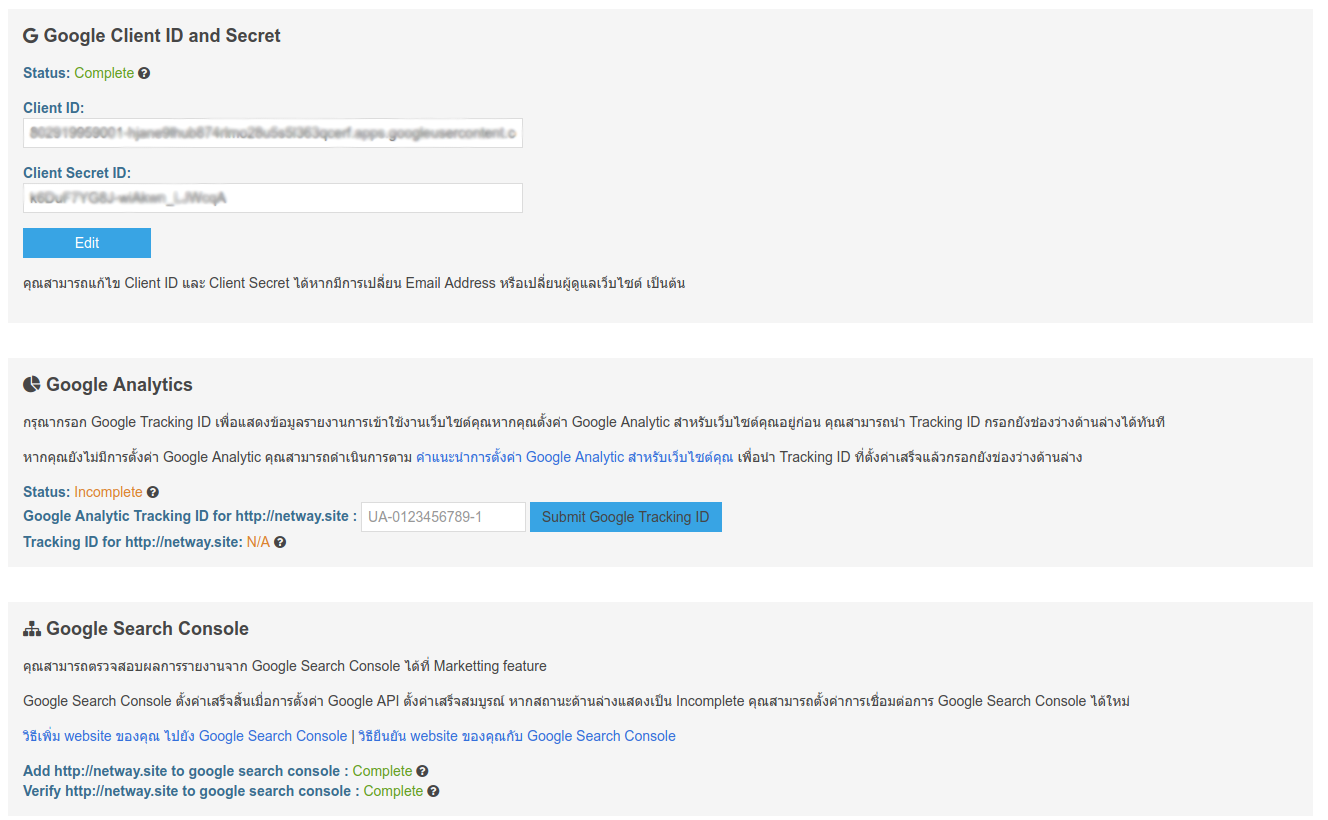
20.png

===================================================

How to Setup Google Analytics


Twitter Login Setup for Built-in Channels Previous Setup Google Analytics for Your WebsiteNext

Articals in this section

  • Hiding banner image
    Updated on 2025-11-18 08:05:17
  • How to use current database for new website created with RVsitebuilder
    Updated on 2025-11-18 08:05:17
  • Delete blog post
    Updated on 2025-11-18 08:05:17
  • Add Facebook share button on your Blog post
    Updated on 2025-11-18 08:05:17
  • How to duplicate a page
    Updated on 2025-11-18 08:05:16
  • How to delete page
    Updated on 2025-11-18 08:05:16
  • How insert YouTube Video popup to a page using Button?
    Updated on 2025-11-18 08:05:16
  • Change & Rearrange RVsitebuilder Navigation Menu.
    Updated on 2025-11-18 08:05:16
  • How to add submenu in RVsitebuilder 7?
    Updated on 2025-11-18 08:05:16
  • Add Favicon for your website
    Updated on 2025-11-18 08:05:16
Privacy Policy   |   Terms of Service   |   Business SLA

rvsitebuilder

facebook twitter linkedin googleplus

COMPANY

Support
Contact
Login
Register
Why Us

SSL CERTIFICATES

Symantec
Thawte
Geotrust
RapidSSL

PRODUCTS

cPanel
CloudLinux
Virtualizor
Softaculous

LINKS

RVssl
RVskin
RVsitebuilder
Blog
RVskin Reseller
RVsitebuilder Reseller

Follow us

© 2020 - 2025 Netway Communication Co.,Ltd. All Rights Reserved.

Contact Us

  • Your address
  • admin@admin.com
RVsitebuilder | RVskin | RVssl | Support | Partner
2025 Company Inc. All rights reserved.   Powered by RVsitebuilder
  • RVsitebuilder
  • RVskin
  • RVssl
  • Support
  • Partner
    • RVsitebuilder NOC Partner
    • RVskin NOC Partner
    • SSL Reseller Program