

logo
  • Contact Us |
  • Login
  • Login
  • RVsitebuilder
  • RVskin
  • RVssl
  • Support
  • Partner
    • RVsitebuilder NOC Partner
    • RVskin NOC Partner
    • SSL Reseller Program
  • Products
    • cPanel
    • CloudLinux
    • Softaculous
    • RVskin
    • RVsitebuilder
    • RVssl
    • Virtualizor
  • Installation
  • Why Us?
order
  • Support
  • Submit Ticket
  • Verify License
Knowledge Base Billing & Licensing Licensing

Ordering and Changing IP for RV Product Licenses

by RV Support
2025-11-25 07:47:33

How to make order for licenses with RVglobalsoft (RVskin, RVsitebuilder, cPanel, Softaculous, Cloudlinux, Virtualizor).
1. Whether you have an account with us or not, once you selected a product to order you’ll be leaded to this page. And the unregistered account will be required to register.

1) Add the IP you want to order the license.
     Server IP Address: the IP of your server
     
If your server is running behind NAT/Firewall. Please add Private IP in Server IP Address first, the second field to add Public IP will be shown automatically. If IP Addresses in these two fields are not correct, the installation will not be successful.
     Server IP Address: the Private IP
     Public IP Address: the Public IP if your server is running behind NAT or Firewall

2) Server Type: Dedicated or VPS
3) Cart subtotal today: The first invoice will calculate at pro-rate from the order date to the next 7th.
4) Recurring: Billing Cycle you selected.
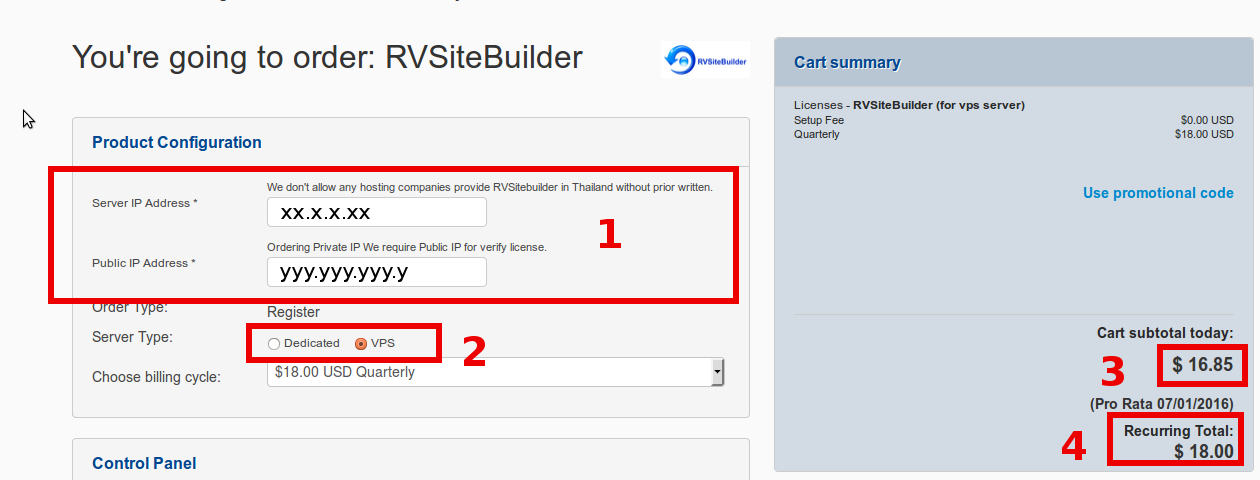


2. You may order more than one product in the same time by choosing other products from the list in “Additional Products” below of the page. To order more, the price will be updated in “Cart summary” on the right hand.

3. Press “Continue”.

Change IP and Update license
You can do it in your account https://rvglobalsoft.com/clientarea -> Services -> Licenses.
   1. Search IP you want to change IP
   2. License Status must be “Active” only
   3. Click "Manage" button to open "Service Management" function.
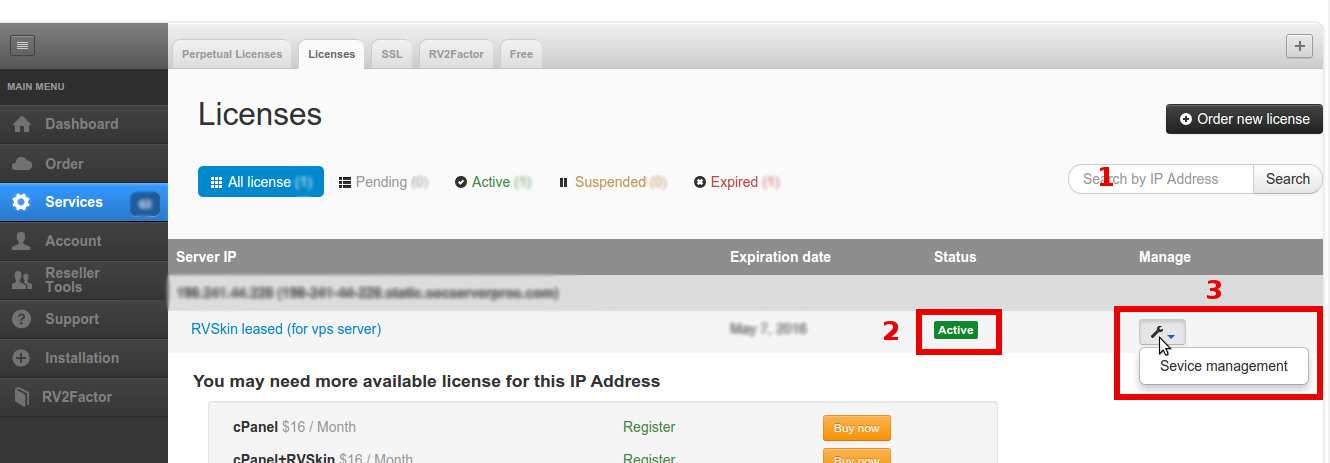


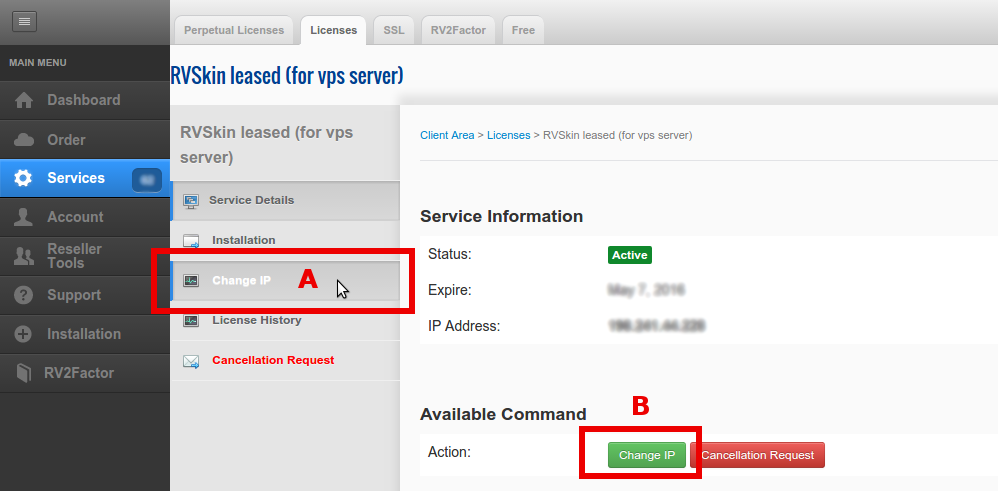
Once the Service Management page opens, you will see "Change IP" with 2 buttons, you can click either A or B.


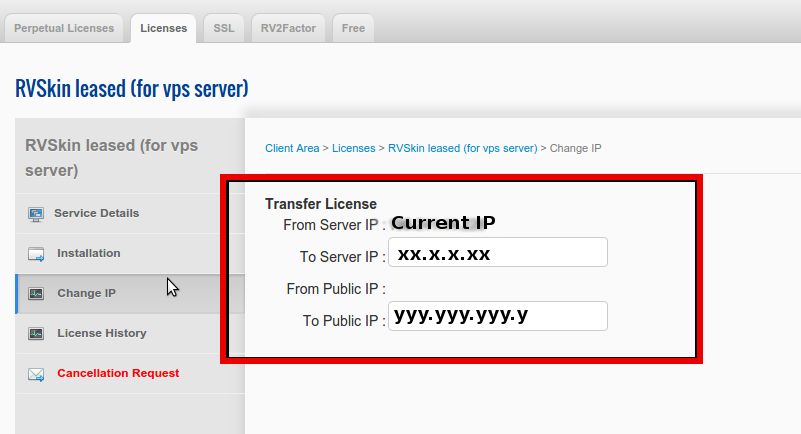
Once the
Change IP page comes, just insert the new IP.
   Server IP Address: the IP of your server
   Public IP Address: the public IP if your server is running behind NAT or Firewall

Once you inserted the destined IP to the field, our system will validate automatically, and the "Change IP" button will be appeared to submit.

In case your current license is with Public IP and you want to update to a license behind NAT IP, please contact our staff to update it for you.


How to transfer RVsitebuilder, RVskin license Previous RVsitebuilder 7 installation requires Developer Token key?Next

Articals in this section

  • RVsitebuilder 7 installation requires Developer Token key?
    Updated on 2025-11-18 08:04:53
  • Ordering and Changing IP for RV Product Licenses
    Updated on 2025-11-25 07:47:33
  • How to transfer RVsitebuilder, RVskin license
    Updated on 2025-11-18 08:04:53
  • How to renew RVskin Perpetual license
    Updated on 2025-11-18 08:04:53
  • Change license type from VPS to Dedicated
    Updated on 2025-11-18 08:04:52
  • How to cancel service and license
    Updated on 2025-11-18 09:17:14
  • Why does RVskin Perpetual license status display as “Suspended”?
    Updated on 2025-11-18 08:04:52
  • What should I do for the terminated license?
    Updated on 2025-11-18 08:04:52
  • How to renew license
    Updated on 2025-11-18 08:04:52
  • Change license type from Dedicated to VPS
    Updated on 2025-11-18 08:04:52
Privacy Policy   |   Terms of Service   |   Business SLA

rvsitebuilder

facebook twitter linkedin googleplus

COMPANY

Support
Contact
Login
Register
Why Us

SSL CERTIFICATES

Symantec
Thawte
Geotrust
RapidSSL

PRODUCTS

cPanel
CloudLinux
Virtualizor
Softaculous

LINKS

RVssl
RVskin
RVsitebuilder
Blog
RVskin Reseller
RVsitebuilder Reseller

Follow us

© 2020 - 2025 Netway Communication Co.,Ltd. All Rights Reserved.

Contact Us

  • Your address
  • admin@admin.com
RVsitebuilder | RVskin | RVssl | Support | Partner
2026 Company Inc. All rights reserved.   Powered by RVsitebuilder
  • RVsitebuilder
  • RVskin
  • RVssl
  • Support
  • Partner
    • RVsitebuilder NOC Partner
    • RVskin NOC Partner
    • SSL Reseller Program