

Please note that, this is NOT the multi-language user interface feature, which you can choose any languages in our program. Here, we talk about the published website which will display in multiple languages, which you'll need to insert the content for those languages by yourself.
You need to create separate projects for each language by following explanations.
1. Create a project for the 1st language, and publish (sample: www.domain.com)
2. Create another project for the 2nd language, and publish (sample: www.domain.com/FR)
3. Go to the 1st project:
3.1 In case, your project is Normal Template.
1) Go to Step 2 -> Side Additional -> Edit Top
2) Type keywords for your language selections (sample: EN|FR)
3) Create hyperlink on both languages by specifying domains you have created in No. 1,2 above.
Sample: EN with www.domain.com, and FR with www.domain.com/FR
3.2 In case, your project is Responsive Template in your project.
1) Go to Step 3 -> Page Editor of each page -> Layout Template , click the "+" on Top or Bottom to edit. (Responsive allows you to add only Top and Bottom)
2) Type keywords for your language selections (sample: EN|FR)
3) Create hyperlink on both languages by specifying domains you have created in No. 1,2 above.
*This setting will take effect by page, not the entire website. You’ll need to do every single page.
Sample :
Home page, EN with www.domain.com, and FR with www.domain.com/FR
Contact Us page, EN with www.domain.com/contactus, and FR with www.domain.com/FR/contactus
**How to open “Layout Template” for Responsive Template in RVsitebuilder 5.4.
A. If your project was created with RVsitebuilder 5.2 , and got updated to RVsitebuilder 5.4. You will be with the Old WYSIWYG.
You need to put mouse on content area in order to open function "Layout Template" to edit.

*This setting will take effect by page, not the entire website. If you want to have it every page, you’ll need to do in every page.
B. If your project is a fresh created in RVsitebuilder 5.4. You’ll get New WYSIWYG.
You can click on “Layout” feature in order to open Layout Template editor, and click the icon again to leave the Layout Template editor.

Then, the area to edit Top and Bottom/Footer will be appeared.
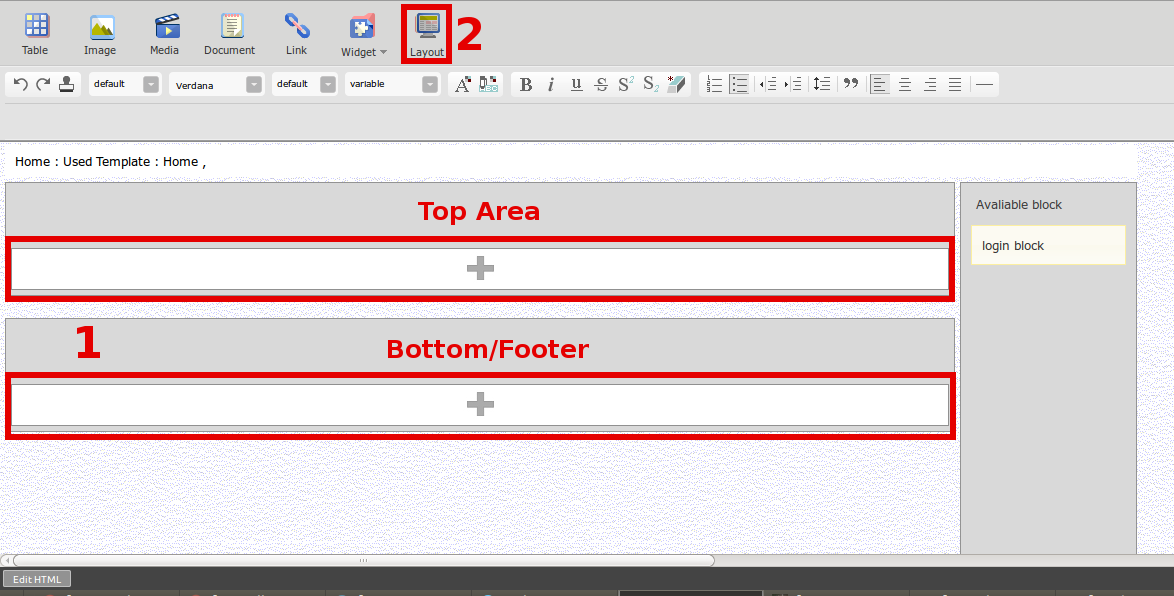
- Click Top or Bottom/Footer you want to edit, and insert content you want.
- Click “Layout” again to get back to page editor.
4. Do No.3 in the 2nd project as well.
