

Create Member Page
by
RV Support
2025-11-25 08:05:15
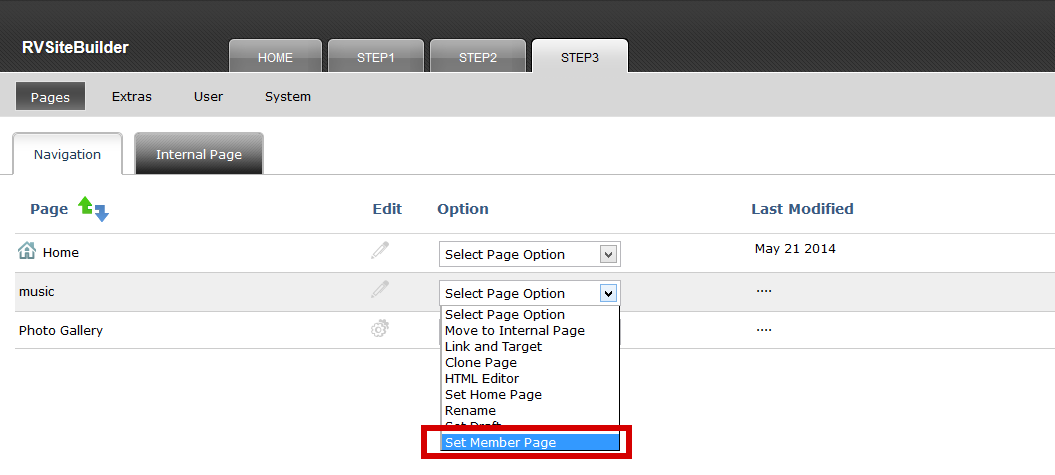
You can set a page to allow only the registered users to access in Step 3 -> "Select Page Option" drop-down list -> "Set Member Page".
Then the member icon will appear at the page and the feature "User" will be appeared at the menu bar in Step 3.
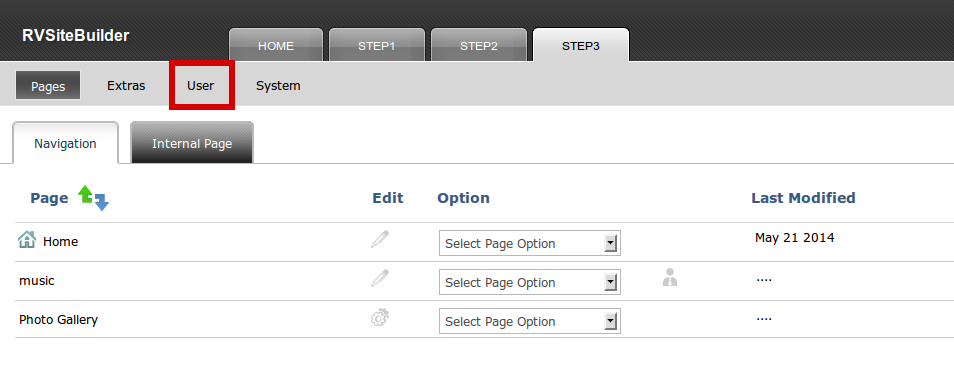
This feature "User", is the place to set admin credential login to the member page you have created. Please go to Step 3 -> User -> Admin Account, to set username and password for the admin.
Once finished settings above. Please publish your website again. The member page will appear with a member register box for your website visitors.
Articals in this section
-
RVSitebuilder 5.4 Release Notes
Updated on 2025-11-18 08:05:28
-
Add Custom Font
Updated on 2025-11-25 08:05:39
-
Add Google Maps with Widget feature in RVsitebuilder
Updated on 2025-11-25 08:05:15
-
Add your image(s) for website banner
Updated on 2025-11-25 08:05:15
-
Change Page Layout in WYSIWYG Editor
Updated on 2025-11-18 09:17:55
-
Copy and Paste Content/Code from the external source
Updated on 2025-11-25 08:05:15
-
Create a website with multi-language
Updated on 2025-11-25 08:05:15
-
Setup Contact Form Sender for Online Form, Contact Us in website
Updated on 2025-11-18 08:05:27
-
Set Website to display on Mobile
Updated on 2025-11-25 08:05:15
-
Set background color/image for Body(content) area
Updated on 2025-11-18 09:17:55
