

How to switch and edit projects between RVsitebuilder 5 and 6
by
RV Support
2025-11-25 08:01:34
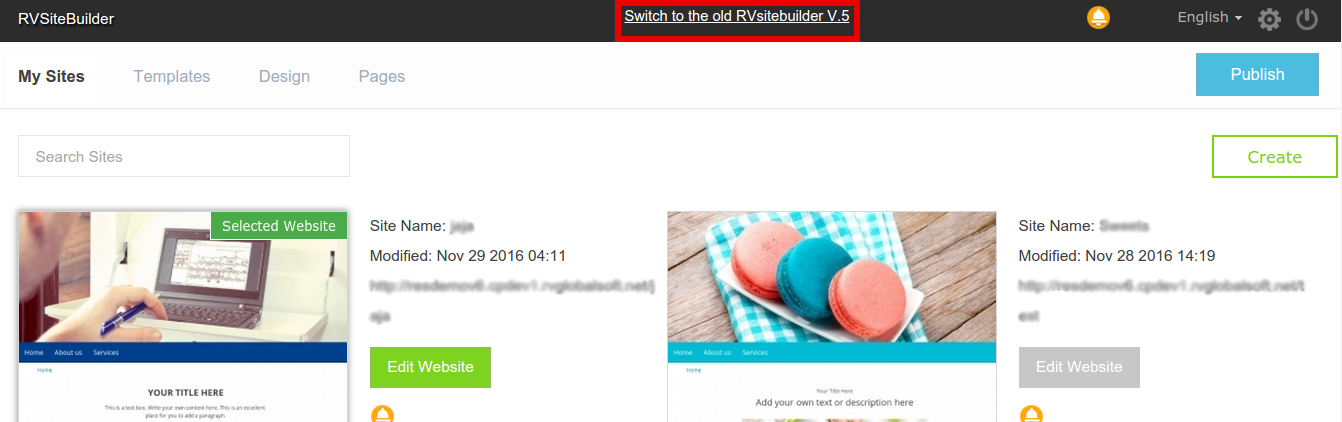
If you have current projects which were created with RVsitebuilder 5 and you want to edit it using editor and features in RVsitebuilder version 6. The projects cannot be edited crossing over version, but RVsitebuilder V.6 allows to use 2 different User Interface versions in order to be able to edit the current version 5 projects and create and enjoy RVsitebuilder SIX.
You can click on “Switch to the old RVsitebuilder V.5” or “Switch to the new RVsitebuilder V.6”. Please be noted that to edit and publish projects need to be on the same version.

========================================
Articals in this section
-
Make a Bookmark on your page
Updated on 2025-11-18 08:04:58
-
How to add a cookie and privacy banner on RVSB 6?
Updated on 2025-11-18 08:04:58
-
How to check your RVsitebuilder version?
Updated on 2025-11-18 08:04:58
-
How to select language on RVsitebuilder program
Updated on 2025-11-18 08:04:58
-
Added a feature for generating “Privacy Policy” page in RVsitebuilder version 6
Updated on 2025-11-18 08:04:58
-
Adding new page, Rearrange page name on Navigation
Updated on 2025-11-25 08:01:37
-
Adding Paypal widget
Updated on 2025-11-25 08:01:35
-
Adding Section
Updated on 2025-11-25 08:01:35
-
Copy an image from external
Updated on 2025-11-25 08:01:35
-
Create a website with RVsitebuilder 6
Updated on 2025-11-25 08:01:35
