

Clearing Your Browser's Cache
Your browser has a folder in which certain items that have been downloaded are stored for future use. Including all setting on RVsitebuilder program are saved or cached.
Over time the actual data online can differ from what your browser has cached, possibly causing the issues.
We recommend clearing your browser's cache periodically and whenever you get a website issue.
To clear the browser's cache, follow the instructions below for the browser type
1. Close all current windows and tabs of your browser.
2. Open a new tab on your browser and make sure that RVsitebuilder is not open on any tabs or windows.
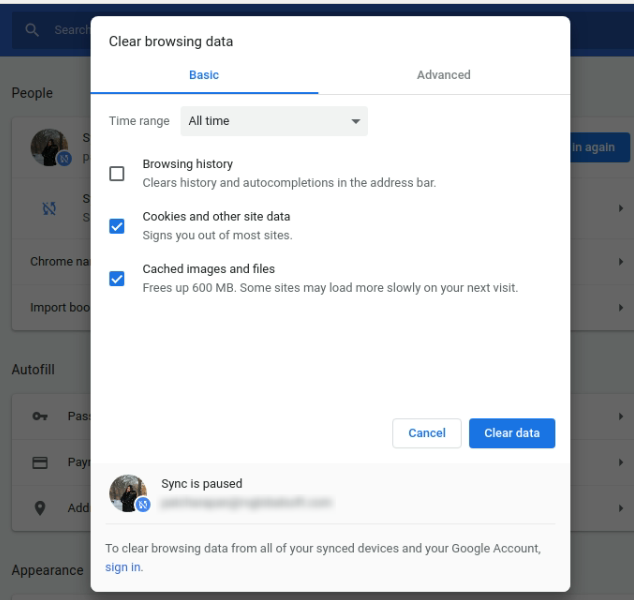
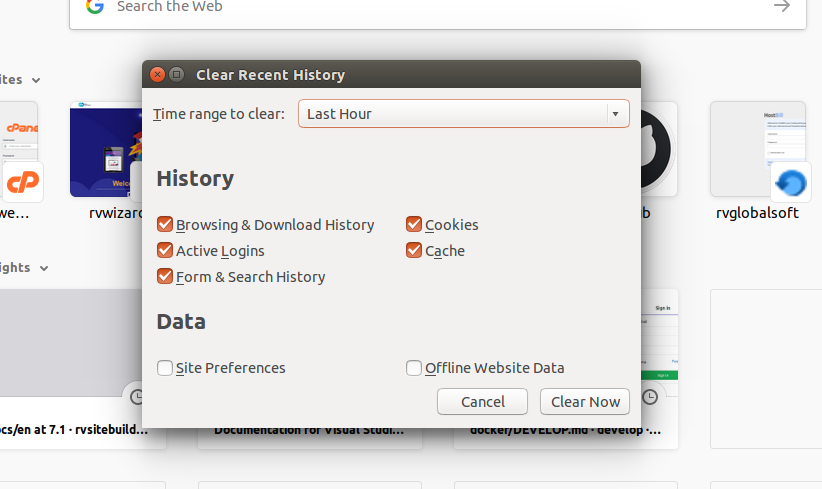
3. Press Ctrl + Shift + Del (press Cmd + Shift + Delete for Mac user) then click below for browser-specific instructions.
Google Chrome Browser
Firefox Browser
Articals in this section
-
Can't save page contents. How to Enable/Disable Modsecurity for a specific Domain on cPanel Server
Updated on 2025-11-18 08:05:43
-
Upload image Error 500 Can't write image data
Updated on 2025-11-18 08:05:43
-
Uploading image gets Error 500
Updated on 2025-11-18 08:05:42
-
I got captcha error "ERROR for site owner: Invalid site key" when I added captcha to register page
Updated on 2025-11-18 09:18:35
-
My Site Background is turned WHITE after I changed Template
Updated on 2025-11-18 08:05:42
-
I can't Save my website after Sections removed
Updated on 2025-11-18 08:05:42
-
When removing all text in button, the button style disappear.
Updated on 2025-11-18 08:05:41
-
A button was removed when removing a button link.
Updated on 2025-11-18 08:05:41
-
Section Background color doesn't change
Updated on 2025-11-18 08:05:41
-
Favicon doesn't change
Updated on 2025-11-18 09:18:35
