

How to paste a plaintext without wrecking your web page
by
RV Support
2025-11-18 08:05:40
If you copy content from an external source, paste to RVsitebuilder editor but the text includes HTML code or the fonts were all screwed up.
A tip for avoiding a broken webpage.
1. Copy a content when you paste on RVsitebuilder project please using Ctrl+Shift+V to clear a format.
2. In case you are using Google Chrome, right-click and select Paste as plain text function.
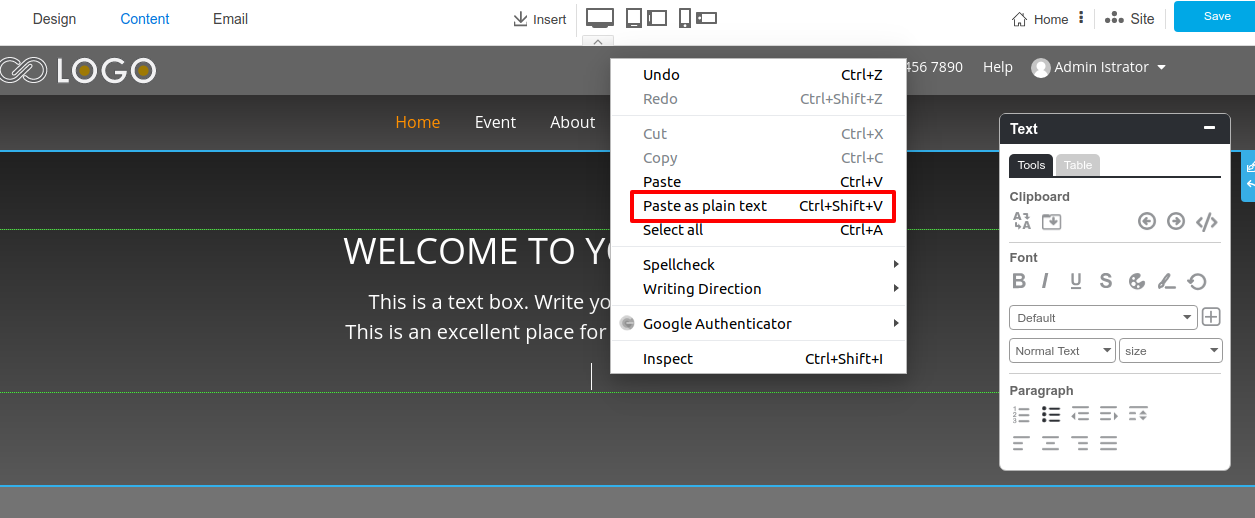
3. Clearing format by pasting on Notepad++ or text cleaner format tool such as TextCleanr, StripHTML.
==============================
Articals in this section
-
Can't save page contents. How to Enable/Disable Modsecurity for a specific Domain on cPanel Server
Updated on 2025-11-18 08:05:43
-
Upload image Error 500 Can't write image data
Updated on 2025-11-18 08:05:43
-
Uploading image gets Error 500
Updated on 2025-11-18 08:05:42
-
I got captcha error "ERROR for site owner: Invalid site key" when I added captcha to register page
Updated on 2025-11-18 09:18:35
-
My Site Background is turned WHITE after I changed Template
Updated on 2025-11-18 08:05:42
-
I can't Save my website after Sections removed
Updated on 2025-11-18 08:05:42
-
When removing all text in button, the button style disappear.
Updated on 2025-11-18 08:05:41
-
A button was removed when removing a button link.
Updated on 2025-11-18 08:05:41
-
Section Background color doesn't change
Updated on 2025-11-18 08:05:41
-
Favicon doesn't change
Updated on 2025-11-18 09:18:35
