

Insert Hyperlink in your image
by
RV Support
2025-11-25 08:05:15
Make sure you open page editor of the page you want already.
1. One click of image.
2. Click on "Link" tool.
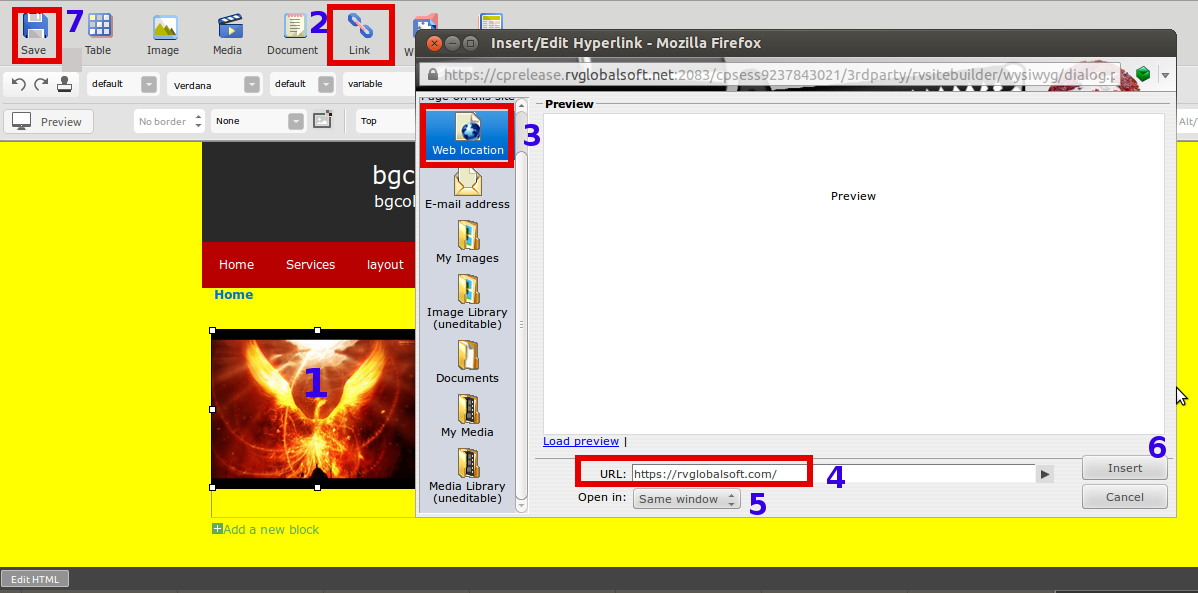
3. Select type of the destination, such as Web Location, E-mail address, My Images, etc.
This sample is “Web Location".
4. Insert URL, or choose file from the destination you’ve choose.
5. Select if you want it opened in Same/New Window.
6. Click "Insert".
7. Click "Save" on page editor.
Articals in this section
-
RVSitebuilder 5.4 Release Notes
Updated on 2025-11-18 08:05:28
-
Add Custom Font
Updated on 2025-11-25 08:05:39
-
Add Google Maps with Widget feature in RVsitebuilder
Updated on 2025-11-25 08:05:15
-
Add your image(s) for website banner
Updated on 2025-11-25 08:05:15
-
Change Page Layout in WYSIWYG Editor
Updated on 2025-11-18 09:17:55
-
Copy and Paste Content/Code from the external source
Updated on 2025-11-25 08:05:15
-
Create a website with multi-language
Updated on 2025-11-25 08:05:15
-
Setup Contact Form Sender for Online Form, Contact Us in website
Updated on 2025-11-18 08:05:27
-
Set Website to display on Mobile
Updated on 2025-11-25 08:05:15
-
Set background color/image for Body(content) area
Updated on 2025-11-18 09:17:55
