

Setup RVlogin Single Sign-on Gateway for WHM and SSH
by
RV Support
2025-11-25 07:47:33
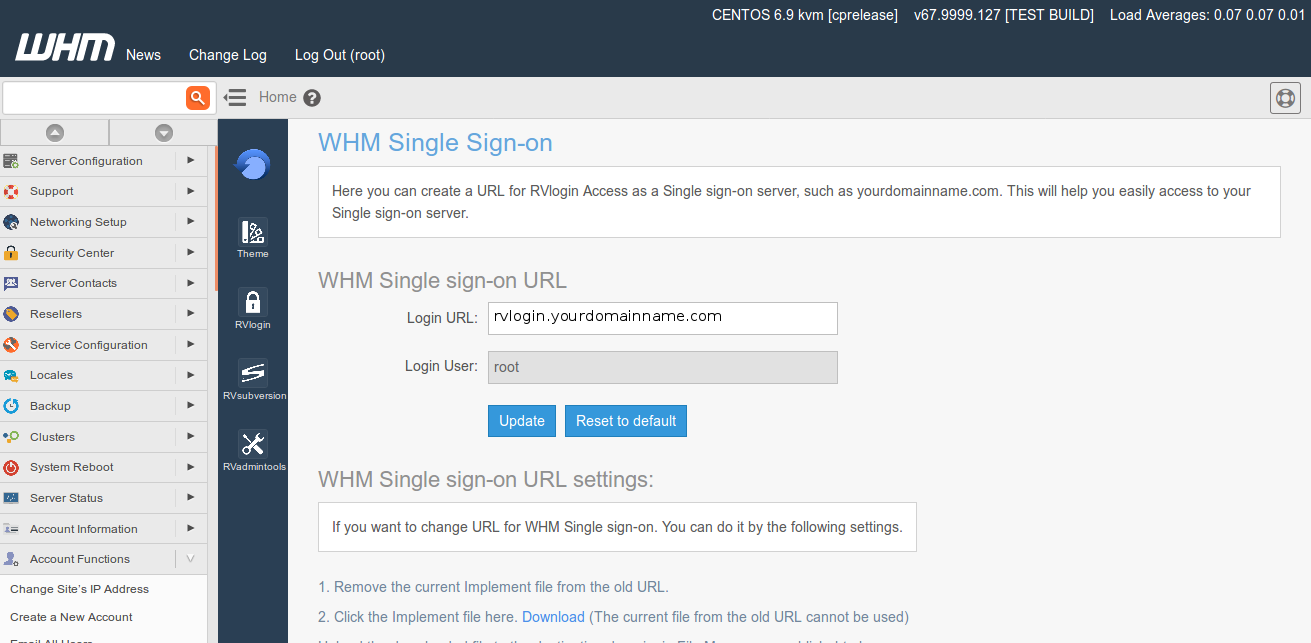
You can create a URL for RVlogin Single sign-on server, such as yourdomainname.com.
This will help you more easier access to your Single sign-on server in one domain name than going to WHM -> Plugins -> RVglobalsoft Manager -> RVlogin Manager.
WHM Single Sign-on Setting:
Go to WHM -> Plugins -> RVglobalsoft Manager -> RVlogin Manager -> WHM Single sign-on.
Use URL gateway as you want.
SSH Single Sign-on Setting:
WHM (root) -> Plugins -> RVglobalsoft Manager -> RVlogin Manager -> SSH Single sign-on.
You will see Host, Port, SSH User, SSH Password fields are already showing as your setting in for WHM.
Articals in this section
-
Access RVlogin Single Sign-on on SSH
Updated on 2025-11-25 07:47:33
-
Edit and Remove Server
Updated on 2025-11-25 07:47:33
-
Cannot access to the destination server via RVlogin SSH Gateway
Updated on 2025-11-18 09:17:14
-
Add Server and Server Group in RVlogin
Updated on 2025-11-25 07:47:33
-
Add User to access to RVlogin Single sign-on
Updated on 2025-11-25 07:47:33
-
Setup RVlogin Single Sign-on Gateway for WHM and SSH
Updated on 2025-11-25 07:47:33
-
Access RVlogin Single sign-on on WHM
Updated on 2025-11-25 07:47:33
